helm-charts
EnkryptAI Stack Deployment
This document outlines the infrastructure and configuration requirements for deploying the EnkryptAI stack on an existing Kubernetes cluster.
There are various components such as Guardrails, Redteaming etc that are required for the deployment of the EnkryptAI stack. In this document, we are giving example of AWS and EKS cluster but the chart can be used for other cloud providers as well. If you get into any issues, reach out to us or raise an issue in this Github repo.
Architecture
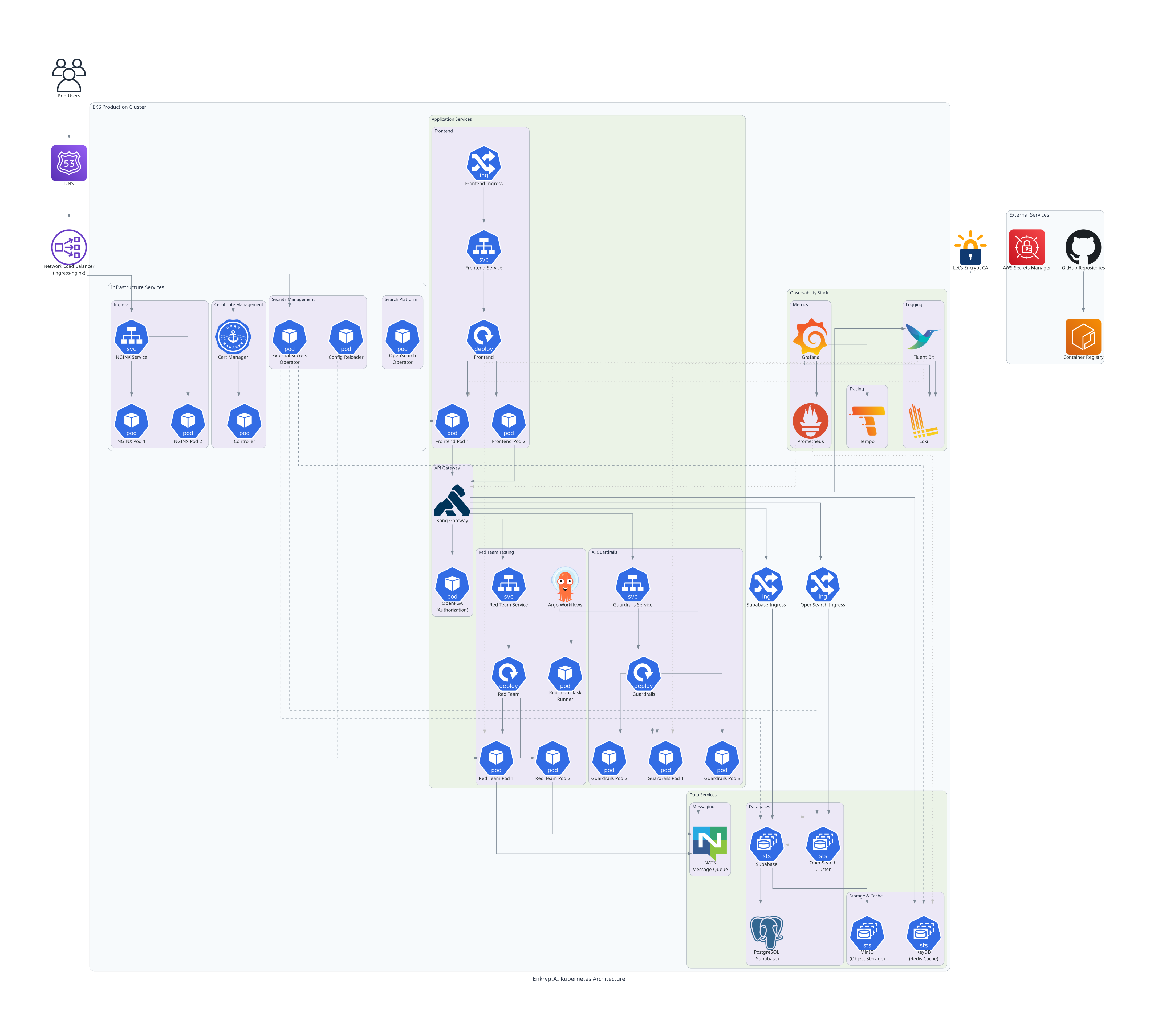
Prerequisites
GPU Node(s) to run Guardrails
The Guardrails component requires GPU-enabled nodes particularly NVIDIA V100 (minimum 16 GB VRAM recommended) or above. Create a dedicated GPU node group using the following configuration.
Node Group Name: gpu-node-group
| Configuration | Value |
|---|---|
| Instance Type | p3.2xlarge |
| Capacity Type | ON_DEMAND |
| AMI Type | AL2023_x86_64_NVIDIA |
| Disk Size | 100 GB (gp3) |
| Scaling Configuration | Desired: 2 • Min: 1 • Max: 2 |
[!WARNING] Avoid using SPOT instances because it can lead to unexpected behavior.
[!NOTE] The Guardrails pod requires a GPU and will be scheduled exclusively on this node group.
Redteaming Node Group
The Redteaming workloads run on a separate node group optimized for compute-intensive tasks.
Node Group Name: redteaming-node-group
| Configuration | Value |
|---|---|
| Instance Type | r7i.xlarge |
| Capacity Type | ON_DEMAND |
| AMI Type | AL2_x86_64 |
| Disk Size | 100 GB (gp3) |
| Scaling Configuration | Desired: 2 • Min: 2 • Max: 10 |
| Labels | dedicated: redteaming |
| Taints | app=redteaming:NoSchedule |
[!NOTE] This node group ensures Redteaming jobs are scheduled exclusively on dedicated infrastructure. It is dependent on NATS, NACK, Argo Workflows and Argo Events.
Namespaces and Secrets
Before installing the Helm chart, make sure the following namespaces and secrets are created. EnkryptAI team will provide the secret values separately.
Create Namespaces
kubectl create namespace enkryptai-stack
kubectl create namespace redteam-jobs
Create Secrets
| Namespace | Secret Name |
|---|---|
| enkryptai-stack | elastic-env-secret |
| enkryptai-stack | frontend-env-secret |
| enkryptai-stack | gateway-env-secret |
| enkryptai-stack | gateway-migration-env-secret |
| enkryptai-stack | guardrails-env-secret |
| enkryptai-stack | onprem |
| enkryptai-stack | openfga-env-secret |
| enkryptai-stack | opensearch-cred |
| enkryptai-stack | opensearch-securityconfig |
| enkryptai-stack | postgres-superuser-secret |
| enkryptai-stack | redteam-proxy-env-secret |
| enkryptai-stack | s3-cred |
| enkryptai-stack | superuser-secret |
| redteam-jobs | redteam-proxy-env-secret |
Note:
If the required secrets are not provided by the EnkryptAI Team, you may need to make certain configuration changes manually.
Please refer to the secrets documentation for detailed instructions.
Secret Usage Overview
The following table summarizes which applications use each secret.
Application Groups
- Internal Applications:
gateway-kong,frontend,redteaming,guardrails - Self-hosted (on-prem) Platform Applications:
opensearch,openfga,CloudNativePG
| Secret Name | Used By |
|---|---|
elastic-env-secret |
gateway-kong, opensearch |
frontend-env-secret |
frontend |
gateway-env-secret |
gateway-kong |
gateway-migration-env-secret |
gateway-kong |
guardrails-env-secret |
guardrails |
onprem |
Supabase (on-prem database and related services) |
openfga-env-secret |
openfga |
opensearch-cred |
opensearch |
opensearch-securityconfig |
opensearch |
postgres-superuser-secret |
Supabase on-prem |
redteam-proxy-env-secret |
redteaming, redteam-jobs |
s3-cred |
redteaming, Supabase (on-prem MinIO for internal artifact storage) |
superuser-secret |
Postgres CNPG credentials |
Other components required on the Kubernetes cluster
Before installing the EnkryptAI Helm charts, ensure the following components are available and configured.
Cluster Requirements
| Component | Description | Installation Reference |
|---|---|---|
| Kubernetes Cluster | EKS Version ≥ 1.31 (tested on v1.33.0) | Kubernetes Docs |
| Cert Manager (AWS Certificate Manager) | Used for managing TLS/SSL certificates for services. | AWS Cert Manager Setup |
| Ingress Controller (NGINX) | Required for routing external traffic to services inside the cluster. | NGINX Ingress Controller |
| Metrics Server | Required for resource metrics (CPU/Memory) used by autoscalers and monitoring. | Metrics Server Installation |
[!NOTE] Ensure all components are in a Ready state before proceeding with Helm chart installation.
We have tested the setup with following versions:
This Helm chart setup has been tested on Kubernetes v1.33.0 with:
- AWS EKS as the underlying cluster provider
- Cert manager for TLS management
- NGINX Ingress Controller 1.13.3
- Metrics Server v0.8.0
Compatibility with other Kubernetes versions or distributions may vary.
NOTE: Ensure that your vpc environment has access to pull image required for enkryptai-stack. For more info check image information doc
Installation
Ingress Requirements
| Service / Component | Purpose | Domain | Ingress Class (Controller) | Certificate Source |
|---|---|---|---|---|
| Frontend (Web App) | EnkryptAI Web UI | app.<domain> |
nginx (or alb if on AWS) |
cert-manager (Let’s Encrypt) / ACM (for ALB) |
| Gateway-Kong (API Gateway) | Routes all backend API traffic | api.<domain> |
nginx (or alb) |
cert-manager / ACM |
| Supabase (Auth Service) | Authentication & Database APIs | auth.<domain> |
nginx (or alb) |
cert-manager / ACM |
For NGINX Ingress
If you’re using NGINX as your ingress controller, configure TLS through cert-manager as shown below in your values file of enkryptai-stack helm chart:
ingress:
  enabled: true
  className: nginx
  annotations:
    cert-manager.io/cluster-issuer: "letsencrypt-prod"
    nginx.ingress.kubernetes.io/proxy-buffer-size: "128k"
  hosts:
    - host: app.example.com
      paths:
        - path: /
          pathType: Prefix
  tls:
    - secretName: frontend-tls
      hosts:
        - app.example.com
Repeat similar configuration for your API (api.example.com) and Auth (auth.example.com) services.
For AWS ALB Ingress (when className: alb)
If your environment uses AWS Load Balancer Controller (ALB) instead of NGINX,
you do not need cert-manager or TLS secrets.
Instead, you attach ACM certificates using ALB annotations directly in your values file of enkryptai-stack helm charts.
ingress:
  enabled: true
  className: alb
  annotations:
    alb.ingress.kubernetes.io/scheme: internet-facing
    alb.ingress.kubernetes.io/listen-ports: '[{"HTTP":80},{"HTTPS":443}]'
    alb.ingress.kubernetes.io/certificate-arn: arn:aws:acm:<region>:<account-id>:certificate/<your-cert-id>
    alb.ingress.kubernetes.io/ssl-redirect: '443'
  hosts:
    - host: app.example.com
      paths:
        - path: /
          pathType: Prefix
Note:
- The ACM certificate must exist in the same AWS region as your EKS cluster.
| When using | Set ingressClassName to |
Cert managed by |
|---|---|---|
| NGINX Ingress Controller | nginx |
cert-manager |
| AWS Load Balancer Controller (ALB) | alb |
AWS ACM |
| Ingress Controller | Certificate Source | Configuration Method |
|---|---|---|
| NGINX | cert-manager (Let’s Encrypt) | via tls: + cert-manager.io/cluster-issuer |
| ALB | AWS Certificate Manager (ACM) | via alb.ingress.kubernetes.io/certificate-arn annotation |
Helm chart installation
Below are available Helm Charts. To install complete enkryptai-stack you need to install enkryptai-stack and platform helm chart.
| Chart | Description |
|---|---|
enkryptai-stack |
Full-stack deployment including all EnkryptAI services |
platform |
Core platform dependencies and shared infrastructure |
enkryptai-lite |
Lightweight deployment — includes Red Teaming and Guardrails components only |
Installation of EnkryptAI Stack
- Kubernetes Secrets. This will be provided by Enkryptai
kubectl apply -f secrets/
- Add the helm chart repository
helm repo add enkryptai https://enkryptai.github.io/helm-charts
helm repo update
Update Complete. ⎈Happy Helming!⎈
- Install Platform Helm Chart
helm upgrade --install platform enkryptai/platform-stack -n enkryptai-stack -f ./values/platform.yaml --timeout 15m
Release "platform" does not exist. Installing it now.
I1023 12:33:44.463885  237189 warnings.go:110] "Warning: spec.template.spec.affinity.nodeAffinity.preferredDuringSchedulingIgnoredDuringExecution[0].preference.matchExpressions[0].key: node-role.kubernetes.io/master is use \
"node-role.kubernetes.io/control-plane\" instead" I1023 12:33:44.474265  237189 warnings.go:110] "Warning: spec.template.spec.affinity.nodeAffinity.preferredDuringSchedulingIgnoredDuringExecution[0].preference.matchExpressions[0].key: node-role.kubernetes.io/master is use \
"node-role.kubernetes.io/control-plane\" instead"I1023 12:36:49.296107  237189 warnings.go:110] "Warning: unknown field \"spec.nodePools[0].NodeSelector\""
NAME: platform
LAST DEPLOYED: Thu Oct 23 12:32:38 2025
NAMESPACE: enkryptai-stack
STATUS: deployed
REVISION: 1
- Install Enkryptai-stack Helm Chart
a. Install Gateway-Kong configmap
kubectl apply -f https://raw.githubusercontent.com/enkryptai/helm-charts/refs/heads/main/charts/enkryptai-stack/gateway-temp-config-map.yaml
b. Install Helm chart
helm upgrade --install enkryptai enkryptai/enkryptai-stack -n enkryptai-stack -f ./values/enkryptai-stack.yaml --timeout 15m
Release "enkryptai" does not exist. Installing it now.
I1023 12:43:26.132872  244265 warnings.go:110] "Warning: spec.template.spec.containers[0].env[18]: hides previous definition of \"GLOBAL_S3_ENDPOINT\", which may be dropped when using apply"
NAME: enkryptai
LAST DEPLOYED: Thu Oct 23 12:43:06 2025
NAMESPACE: enkryptai-stack
STATUS: deployed
REVISION: 1
NOTES:
Read the documentation of each chart to perform post-installation tasks. This is required before you run any redteam jobs
Available Helm Charts
| Chart | Description |
|---|---|
enkryptai-stack Doc |
Full-stack deployment including all EnkryptAI services |
platform Doc |
Core platform dependencies and shared infrastructure |
enkryptai-lite Doc |
Lightweight deployment — includes Red Teaming and Guardrails components only |
NOTE: Provide SSL Certificates for Your Domains
Before you start using the EnkryptAI Stack, ensure the following subdomains are properly configured and secured with valid SSL/TLS certificates:
- app.
— Used by **EnkryptAI Frontend** - auth.
— Used by **EnkryptAI Auth Service** - api.
— Used by **EnkryptAI Kong (API Gateway)**
Example: If your base domain is
example.com, the stack will use:app.example.com auth.example.com api.example.com
Make sure you:
- Create DNS records for each subdomain.
- Attach valid SSL certificates for all three domain
Monitoring
For accessing Redteaming job logs and more, please refer to the Monitoring documentation.
Troubleshooting
For troubleshooting, please refer to the Troubleshooting documentation
Security
TBD
Report security issues to EnkryptAI Support.
Support
If you face any issues during deployment, reach out to the EnkryptAI Support or raise a GitHub issue in this repository.